
Every module in Microbizz has a set of permissions, which is the case for the Setup module as well.
For a general understanding of permissions visit this section.
Keep in mind that the user must log off the system and back again before the permissions take effect.
ç
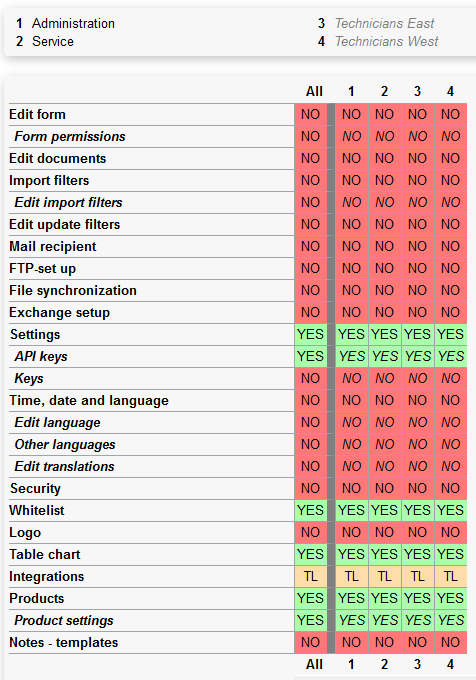
The available permissions are as follows:
- Edit form: Allows you to specify who has the permission to access Forms (Setup > Forms)
- Form permissions: Allows you to specify who has permission to access to Form permissions (Setup > Forms > Permissions)
- Edit documents: Allows you to specify who has permission to access Documents (Setup > Documents)
- Import filters: Allows you to specify who has permission to access Import Filters and Export Filters (Setup > Filters)
- Edit Import filters: Allows you to specify who has permission to edit Import Filters.
- Edit update filters: Allows you to specify who has permission to access Update Filters (Setup > Filters > Update Filters)
- Mail recipient: Allows you to specify who has permission to access Mail recipient (Setup > Integrations > Mail recipient)
- FTP-set up: Allows you to specify who has permission to access FTP (Setup > Integrations >FTP)
- File synchronization: Allows you to specify who has permission to access File Synchronization (Setup > Integrations > File Synchronization)
- Exchange setup: Allows you to specify who has permission to access Exchange (Setup > Integrations > Exchange)
- Settings: Allows you to specify who has permission to access Settings (Setup > Settings)
- API keys: Allows you to specify who has permission to access API keys (Setup > Settings > API keys)
- Keys: Allows you to specify who has permission to access Product Keys (Setup > Settings > Product Keys)
- Time, date and language: Allows you to specify who has permission to access Time, date and language (Setup > Settings > Time, date & language)
- Edit language: Allows you to specify who has permission to access Edit Language
- Other languages: Allows you to specify who has permission to access Other Languages
- Edit translations: Allows you to specify who has permission to access Edit Translations
- Security: Allows you to specify who has permission to access Log In (Setup > Settings > Log In)
- Whitelist: Allows you to specify who has permission to access Whitelist (Setup > Settings > Whitelist)
- Logo: Allows you to specify who has permission to access Logo (Setup > Settings > Logo)
- Table chart: Enables access to the "Charts" menu item for a table, eg. the table displaying a search result
- Integrations: Allows you to specify who has permission to administer integrations (Setup > Integrations)
- Products: Allows you to specify who has permission to administer products (Setup > Products)
- Product settings: Allows you to specify who has permission to access product settings (Setup > Settings > General > Setup)
- Notes - templates: Allows you to specify who has permission to access Note Templates (Setup > Notes > Templates)