
This page gives an overview of how floating point numbers are handled in Microbizz.
It is unclear what the various columns mean (Visual, Editing, Validation) - the original author should explain it in details.
It is language that controls number format (Excaption is IOS - there numbers are controled by Region in Phone settings)
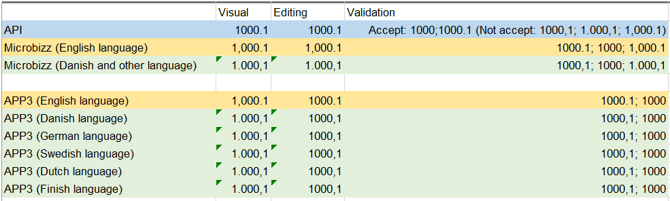
Numbers in Microbizz
|
Language |
Visual |
Editing |
Validation |
|---|---|---|---|
|
English |
1,234,567.89 |
1234567.89 |
1,234,567.89 1234567.89 |
|
Danish |
1.234.567,89 |
1234567,89 |
1.234.567,89 1234567,89 |
Numbers
in App3|
Language |
Visual |
Editing |
Validation |
|---|---|---|---|
|
English |
1,234,567.89 |
1234567.89 |
1,234,567.89 1234567.89 |
|
Danish |
1.234.567,89 |
1234567,89 |
1.234.567,89 1234567,89 |
Number in API
|
Language |
Visual |
Editing |
Validation |
|---|---|---|---|
|
All languages |
|
|
1234567.89 |
Exceptions (Currently - perhaps needs to change)
Numbers in Microbizz - Form - Number field - Standard value
https://system15.microbizz.dk/sys/todo/details/?id=14093
|
Language |
Visual |
Editing |
Validation |
|---|---|---|---|
|
English |
|
|
1234567.89 1234567,89 1,234,567.89 1.234.567,89 |
|
Danish |
|
|
1234567.89 1234567,89 1,234,567.89 1.234.567,89 |
Numbers in Microbizz - Integration - Visma
|
Language |
Visual |
Editing |
Validation |
|---|---|---|---|
|
All languages |
|
|
1234567.89 |
Numbers in Microbizz - Invoicelines - Amount
|
Language |
Visual |
Editing |
Validation |
|---|---|---|---|
|
English |
1234567.89 |
1234567.89 |
1234567.89 |
|
Danish |
1234567,89 |
1234567,89 |
1234567,89 |
What if
|
Language |
Editing |
Expected result |
|---|---|---|
|
English |
0 3,333 333.89 333,333 333.333 333,333.333 333.333,333 |
Fail 333333 333.333 |
|
Danish |
0 3,333 333.89 333,333 333.333 333,333.333 333.333,333 |
|